









A report by Grand View Research reveals that the $10.03 billion video conferencing industry is rapidly evolving, fueled by its growing applications.
Doctors now offer remote consultations via video, educators are conducting virtual classrooms, and businesses are hosting global meetings with ease. Additionally, legal professionals are holding remote depositions, and customer service teams are providing real-time support through video chat.
But to ensure seamless and secure video communication across any device, operating system, or browser, from anywhere in the world, choosing the right embeddable video chat SDK is crucial for developers at enterprises creating these apps. Right selection requires a thorough evaluation.
In this article, we'll guide you through the key technical aspects to consider when selecting an SDK and explain why Enghouse Video’s Video SDK stands out as the best choice for embedded video chat.
Four Things To Consider While Selecting the Right Embeddable Video Chat SDK
A robust embeddable video chat SDK should offer high-quality video and audio, low latency, and decent communication even in challenging network conditions. However, those are not the only considerations you want to consider as a developer. Here are four more that deserve your attention and careful evaluation.
- Cross-Platform Support
- Security
- Bandwidth Management
- Scalability
1. Cross-Platform Support
Imagine you have a video chat SDK that doesn’t support most popular platforms. In that case, you can’t offer all your users the same video experience. It would also increase your development complexities (separate code bases, platform-specific issues, etc.).
Cross-platform support should rank high on your embeddable video SDK selection criteria list. Here are some impacts you can expect with cross-platform support:
Consistent User Experience
Your users are likely to use various devices (and operating systems). If you want your users to experience a similar feel and video experience no matter which devices they log in from, you need a video SDK that supports popular platforms. This also ensures that updates or new features will be uniformly available across all devices.
Development Flexibility
Cross-platform SDKs remove a lot of development complexity by providing an abstraction layer between your code and the platform. This abstraction layer allows your code to be compiled into platform-specific binaries ( or, in some cases, it provides interpreted or runtime-managed solutions.) As a result, you can write code once and use it for multiple platforms.
One fitting example is the React Native Framework. Cross-platform video SDKs often leverage this framework to provide a UI abstraction layer over iOS and Android. When you write UI components in JS, React just maps those components to native components.
Broader Reach
Cross-platform SDKs support a wide range of devices. That means if you build your application using a cross-platform video chat SDK, users with various devices can enjoy the same video experience. This makes it easy for you to gain more users ( you don’t have to convince your new users to use specific platforms) and offer video conferencing facilities to a larger number of users.
2. Security
Embedding a video conference SDK into your application involves entrusting your SDK vendor with sensitive user data ( video, audio, PII and PHI, etc.) and relying on your SDK to meet legal requirements.
That’s why security is one of the critical factors you should consider before selecting an embeddable video conferencing SDK. More precisely, you want to pay attention to the following:
Security Governance Policy
First, check if the vendor has strict security governance policies. Your potential video SDK provider should have an ISO 270001 certification ( or a similar certification) to prove its commitment to data security. Once you verify the credentials, explore the specific controls the SDK provider offers to meet your needs.
User Login and Database Security
This is another critical aspect of video SDK security, especially when dealing with confidential user data. The industry standard is to provide secured access using Transport Layer Security (TLS). With TLS enabled, your video chat SDK should use an HTTP channel to establish a connection.
Apart from connection security, you must also consider database security measures.
If your organization utilizes an external system (such as LDAP, SAML, and AD) to manage user accounts, ensure your SDK supports these integrations. Additionally, if your user data is stored on the provider’s database, ensure that information is always hashed and salted for protection.
Media Encryption
Unprotected media streams can be the target of DDoS attacks, eavesdropping, and tempering attempts. Choose a video SDK that relies on end-to-end encryption (E2EE) and secure protocols like SRTP to protect media streams.
HIPAA Compliance for Healthcare Applications
The HIPAA Act sets standards to protect electronic protected health information (ePHI). If your app must comply with HIPAA standards, ensure your video chat SDK provides strict access control, restricted access to call rooms, encrypted media transfer, no storage of ePHI, and security monitoring.
4. Bandwidth Management
Video conferencing is usually smooth if the network condition is strong. However, if you are connecting a large number of users, chances are some of them will be on less-than-ideal networks. Your video chat SDK must have strong bandwidth management capabilities to deliver a seamless video chat on those networks.
Here are a few things to look out for:
Versatile & Royalty Free Codecs
Codes are software implementations of video encoding and decoding algorithms. They ensure a good viewing experience across all networks and efficient bandwidth usage.
Ideally, your embeddable video chat SDK should support widely used codecs like VP8 and VP9, etc. In some situations, having multiple codec options can provide you extra bandwidth management flexibility.
Also, if you need more precise control, check what options the SDK offers for configuring codec settings.
Note: Codec selection is generally automatic, but you might need to write extra code for legacy systems. If you need assistance, the Enghouse team is available to help.
Scalable Video Coding(SVC)
It divides video content into multiple layers of varying quality. During streaming, the most suitable layer is displayed based on your users' devices and network conditions.
This adaptability ensures a smooth viewing experience for your participants, regardless of their internet connection speed or device. It helps prevent issues like frozen frames or choppy video, enhancing overall call quality.
Fallback Mechanism
A telltale sign of a good video SDK is the built-in fallback mechanisms. These systems maintain communication even in the poorest network conditions by readjusting the frame rate and switching to audio-only mode.
4. Scalability
If you anticipate future growth or fluctuating user demand, scalability becomes another critical consideration. You want a video chat SDK that can handle extra pressure from different networks and devices without hampering video communication quality.
In that case, here are a few key points to consider:
User Capacity and Load Management
Video SDKs that handle a large number of concurrent users can scale well. These SDKs often utilize robust load balancing and dynamic scaling to accommodate surges during peak usage hours.
For example, the Enghouse Video’s Video SDK can host up to 200 participants in a single call. With additional charges, you can add even more participants to a single conference call.
To find out about the capabilities of your chosen video chat SDK, consult the provider’s website and documentation.
Global Distribution
To ensure seamless video quality for your users, your SDK vendor should have data centers near your users' locations. Routing calls to closet data centers reduces latency and minimizes packet loss, which enhances overall video quality. Therefore, an SDK with a globally distributed network of data centers is essential for serving a worldwide user base. For instance, Enghouse Video’s Video SDK is backed by a global network of data centers.
When choosing an SDK, prioritize options with a solid global presence.
API and Infrastructure
scalability will not be an issue if there are API features for managing rooms, user sessions, and media streams when needed.
It’s also crucial to evaluate the SDK provider’s infrastructure. A provider backed by scalable platforms like Google Cloud or AWS ensures your application can handle increased demand without complications.
What Makes Enghouse Video an Excellent Video Chat SDK
The market offers numerous embeddable video chat SDKs, but not all will meet your needs. While some excel in certain features like scalability or ease of use, they might fall short in areas such as security or customization. This makes a thorough evaluation essential.
The Video SDK by Enghouse Video is a robust solution that works seamlessly across major platforms, including iOS, Android, Windows, and Mac. It offers cross-browser support for all major browsers, such as Chrome, Safari, and Edge. The SDK balances performance, security, and flexibility, making it adaptable to various requirements.
Security
Enghouse demonstrates its strong commitment to security, as evidenced by its ISO 27001 certification. This dedication extends to the Enghouse Video’s Video SDK, which offers multiple levels of protection.
First, user login pages are secured with TLS to prevent MITM attacks. Additionally, connections between endpoints are encrypted using HTTPS channels, further protecting data in transit.
To protect transferred media, the SDK uses AES encryption over SRTP, preventing interception during calls. Video SDK also enhances security by generating unique guest links, PINs, and meeting IDs for each meeting, blocking unauthorized access and data theft.
For user database protection, the SDK and, by extension, the Video system supports LDAP, SAML, and AD for customers using external databases for user account management. For others, passwords are hashed and salted using PBKDF2, ensuring they remain secure even during a security breach.
This video conferencing SDK is also HIPAA and GDPR-compliant.
Effective Bandwidth Management
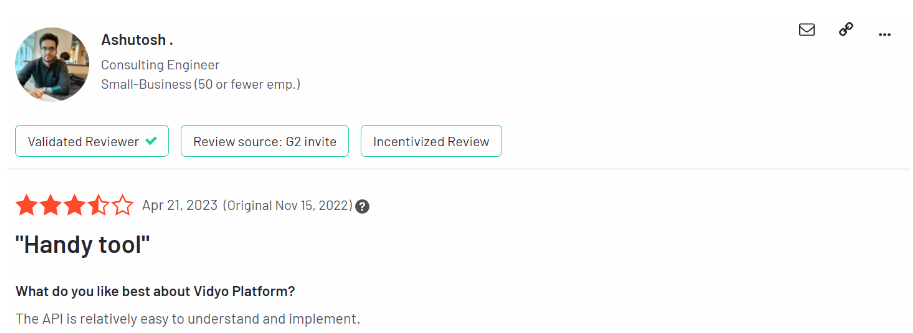
Enghouse Video’s Video SDK is designed to use the VP8/9 SVC to deliver videos over various networks, including low-bandwidth and high-latency ones. It can maintain a connection even on a network with up-and-down speeds as low as 256Kbps. In case there is no SVC support, simulcast tech is utilized.
Additionally, Enghouse’s global network of data centers enhances the Video SDK’s resilience, allowing it to perform reliably even in the harshest network conditions. The robust bandwidth management enables many Video SDK customers to serve large audiences consistently.
Source - g2
Scalability
Enghouse Video is supported by the Google Cloud Platform. This, along with Enghouse’s technical capabilities, makes scaling your video conferencing services seamless and secure as a Video SDK user.
Deployment
Unlike many competitors, Enghouse Video’s Video SDK comes with flexible deployment options.
- On-premise deployment: If you have strict security and compliance requirements, the Enghouse team can assist you in deploying VideoPlatform on-premise. This option will give you more control, security, and low latency.
- Private cloud deployment: If you want the cloud's security and scalability, opt for private cloud deployment.
- Hybrid deployment: The Video SDK also supports hybrid deployment. In this way, you can distribute the video workload across private and cloud servers. (For example, on-premise servers are used for daily operation and the cloud for peak timings.)
Developer friendly
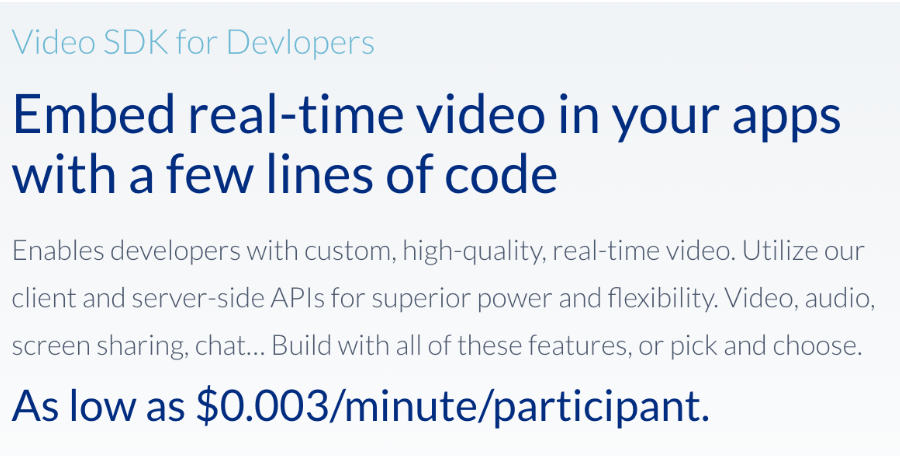
Enghouse Video’s Video SDK is a cross-platform SDK that supports Android, macOS, iOS, WebRTC, and Windows. Its detailed developer guide includes API references and tutorials to help you integrate the Video SDK into your custom applications.
Source - Enghouse Video - Video SDK
The Video SDK offers sample projects on Stackbiltz or Github for hands-on experience. These resources make it easy to experiment and start building with the Video SDK immediately.
Ready to explore Enghouse Video’s Video SDK? Access the sample projects or take a demo to see it in action. With a flexible pricing model, including a free trial and a rate of $0.003/user/min, plus options for custom pricing, the Video SDK provides a scalable solution for your needs.
FAQs
What is an Embeddable Video Chat SDK, and Why Should I Use it?
An Embeddable Video Chat SDK lets you directly incorporate video calling features into your application or website. This saves time and effort by providing your end users with pre-built video chat features and a seamless, uniform video experience.
Why is the Ease of Integration and Developer Support Critical When Selecting a Video Call SDK?
Ease of integration and developer support are critical because they directly affect development time and costs. A well-documented API, clear instructions, and pre-built components enable quick and efficient integration. Comprehensive support, including tutorials and responsive technical assistance, helps troubleshoot issues faster and reduce overall development costs.
How can I Evaluate the Performance and Scalability of a Video Call SDK?
Evaluate performance and scalability using free trials or demos to test call quality, latency, and handling of varying network conditions. Review case studies and benchmark reports for real-world performance insights. Check for scalability features like dynamic bitrate adjustments and integrations with cloud platforms to support large numbers of concurrent users.
How Important is Platform Compatibility When Selecting a Video Call API?
Platform compatibility is crucial as it allows integration across the web, mobile (iOS & Android), and desktop, expanding your user base and ensuring a consistent user experience. It also reduces development effort by allowing a unified codebase across multiple platforms, making development and maintenance more efficient.
What Role Does Security Play in Choosing a Video Call SDK?
Robust security measures ensure that no outsider can steal or intercept confidential data, including company and customer data. This also prevents revenue loss, future lawsuits, and user dissatisfaction.
Contact our Experts
If you have questions complete the form and we will get back to you shortly.
 English
  Français
  日本語
日本語  Español
  Italiano
  Nederlands
  Deutsch