








Interactive Voice Response
Aculab Cloud
Interactive Voice Response
Develop custom Interactive Voice Response (IVR) systems to create a great call experience.

Aculab’s advanced IVR technology allows you to self-service with ease or direct callers to an agent through a simple, easy to learn API. Callers can interact with their voice using our best in class speech recognition from Google, or with their telephone keypad.
Benefits
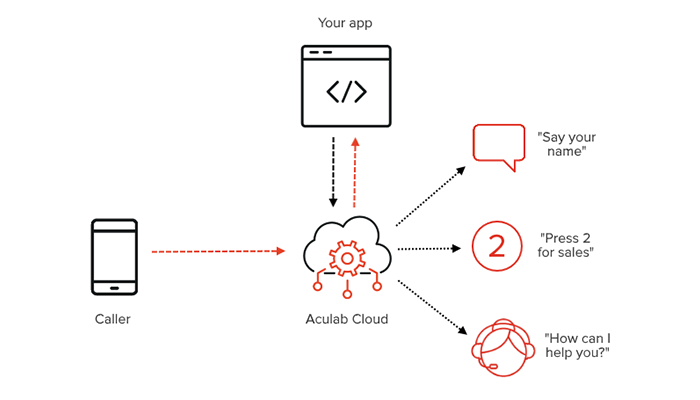
Streamline the user experience
Increase efficiency and decrease waiting time by automating repetitive tasks with an IVR application.
Simplify customer contact
Reach customers using voice - ubiquitous across smart phones, feature phones and landlines.
Authenticate on-the-go
Integrate our voice biometrics system, VoiSentry, into your applications and authenticate your users whilst they’re talking.
Features

Create refined call flows with ease
An easy to use, programmable API enables a wide selection of options for creating your perfect call flow.
Intelligent caller redirection
Send your callers to the right place automatically with best in class speech recognition.
Rock-solid reliability
Our cloud IVR system is hosted on Amazon AWS for a reliable, scalable experience.
Use cases
Healthcare
Have your patients pick up their test results, automated through IVR.
Finance
Provide an effortless customer experience, saving both you and your customer’s valuable time.
Education
Send automated truancy reports to students' parents and guardians.
Documentation
Walkthrough guides, application and deployment notes, datasheets, case studies and white papers.
Walkthrough guides
Application notes
Deployment notes
Datasheets & demos
Case studies
White papers
Technical documentation
Quickstart
Integrate Aculab products into your applications in minutes with this Quickstart guide.
Case studies
Discover how we have helped our clients, and how you too can benefit from Aculab Cloud.
Technical documentation
Find out about the installation guide and other technical documentation here.

See how simple it is, try out the code…
Not sure if Aculab Cloud is for you? Test the API with this sample Python code.
See sample code in other programming languages:
$mp = new Aculab\TelephonyRestAPI\Play();
$mp->addText('Please press 1 for yes or 2 for no');
$menu = new Aculab\TelephonyRestAPI\RunMenu($mp);
$menu->addMenuOption('1','optionyespage');
$menu->addMenuOption('2','optionnopage');
$actions->add($menu);
Trusted by the Best in the Industry







Get in touch!
Interested in seeing how Aculab can power your applications or how you can benefit from our cloud infrastructure?
Contact us today!
 English
  Français
  日本語
日本語  Español
  Italiano
  Nederlands
  Deutsch